100% on your Mac · No network access
Redact tax forms
safely with Elisio
Smart, private document redaction. Your files never leave your device.
- No account
- No uploads
- Checks before it saves
Works with the files you already have
- Scanned PDF
- PNG
- JPEG
- TXT
- CSV
- Word
- Excel
How it works
Three steps. Zero uploads.
Elisio does all of its work on your Mac. Drop a document in, check what it found, and save a clean copy.
- 1
Drop your document
Drag in a PDF, scan, photo or Office file. Your original is never changed.

- 2
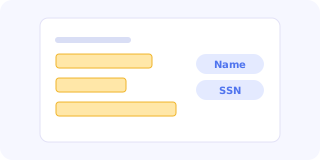
Review what it found
Names, SSNs, account numbers and addresses are highlighted. Keep, remove or add your own.
- 3
Save, verified
Elisio scans the result again before saving. If anything can still be read, it won't save.

No network access. Not even once.
The Elisio app has no permission to connect to the internet. It can't upload, sync, track or phone home, because macOS won't let it. Your documents physically cannot leave your Mac through Elisio.
- ✓ No internet permission
- ✓ No account or sign-in
- ✓ No analytics or tracking
Features
Everything you need to share safely
-
Finds personal details
Names, SSNs, account and routing numbers, addresses, dates of birth.
-
Reads scans & photos
Text recognition runs on your Mac, so scanned and photographed pages work too.
-
Knows tax forms
Understands W-2 and 1040 boxes by their labels, not just patterns.
-
Checks before saving
Re-scans the output and blocks the save if anything is still readable.
-
Remembers your choices
The Dictionary learns what to always redact and what to leave alone.
-
Never touches originals
Your source file stays exactly as it was. Elisio saves a new copy.
-
Private by design
No network, no account, temporary files deleted automatically.
-
No subscription
Free to download. Pro is a one-time purchase, no monthly fee.
Privacy
Your documents are none of our business
Elisio was built so that the safest choice is the only choice. There is nothing to opt out of, because nothing is collected in the first place.
Everything happens on your Mac. Nothing is ever sent anywhere.
Read how Elisio protects your privacy ›✕No uploads
The app has no internet permission, so your files can't leave your Mac through Elisio.
✕No account
No sign-up, no sign-in, no email address needed to use it.
✕No tracking
No analytics, no crash reporters, no ads. Not in the app, not on this website.
✕No logs of your data
Elisio never writes the personal details it finds into logs or reports.
✓Originals untouched
Your source file is never changed. Elisio saves a new, redacted copy.
✓Temporary files deleted
Working files are removed when you save or cancel, and again at launch.
✓Dictionary stays local
The words Elisio learns are stored encrypted, only on your Mac.
✓Proof before saving
The result is checked again, and the save is blocked if anything is still readable.
Real redaction
A black box isn't redaction. Elisio removes the text underneath.
Many "redacted" PDFs still hide the original words under the black bars, ready to copy and paste. Elisio removes the content itself, then checks the saved file to prove it's gone.
Built for tax season
Send your W-2 to your landlord, lender or accountant without oversharing.
Elisio knows where the sensitive boxes are on US tax forms and bank statements, so you share the numbers that matter and nothing more.
Guides
Learn to share documents safely
-
How to Redact a PDF on Mac (the Safe Way)
Black boxes and highlights don't hide anything. Learn how to truly remove names, numbers and addresses from a PDF on your Mac, and how to check your work.
-
How to Remove Your SSN From a W-2 Before Sending It
Landlords and many others ask for a W-2 to check your income, not your identity. Here's how to remove your Social Security number and other details safely.
-
Why Black Boxes in a PDF Don't Really Redact
A black box over text in a PDF often hides nothing. See why covered words can be copied back out, how leaks happen, and how to make sure a redaction is real.
FAQ
Questions, answered
Does Elisio upload my documents anywhere?
No. The app has no network access at all. Everything happens on your Mac, and macOS itself prevents Elisio from connecting to the internet.
Is it really redacted, or just covered?
Really redacted. Elisio removes the underlying text and images, then re-scans the saved file. If any redacted value can still be found, the save is blocked.
Which files does it support?
PDFs (including scans), PNG, JPEG, TXT and CSV for free. Word and Excel with Pro.
Is there a subscription?
No. Elisio is free to download, and Pro is a one-time purchase.
Is there an iPhone or iPad version?
Not yet. Elisio is for Mac first, and an iPhone and iPad version is planned.
What do I need to run it?
A Mac running macOS 26 or later.
Share documents, not your identity.
Questions? We'd love to hear from you.